About Webstudio
Introduction
WebStudio is a free visual website builder designed for creators who want more design freedom than traditional drag-and-drop tools. It allows users to build responsive, production-ready websites using a visual canvas that closely reflects how real websites are structured.
The tool is well-suited for designers, startups, and creators who want to prototype or launch modern websites without relying on developers. Unlike beginner-only builders, WebStudio focuses on clean structure, performance, and flexibility, making it a strong option for users who care about both design and scalability.
Because WebStudio runs entirely in the browser, users can design, preview, and publish websites without installing software or setting up complex environments.
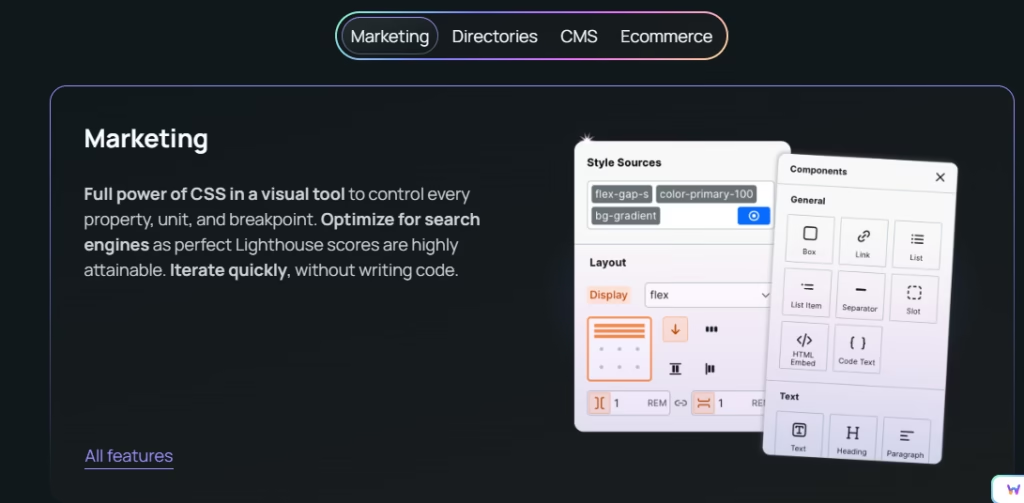
WebStudio provides a visual-first website building experience that gives users control over layout, spacing, typography, and responsiveness. Instead of rigid templates, it allows you to design websites using modern web concepts such as sections, containers, and components.
This makes WebStudio particularly useful for landing pages, marketing websites, portfolios, and startup sites where layout precision matters. Designers can experiment freely while still producing clean, structured output suitable for real-world use.
Many creators evaluate tools like WebStudio alongside other Free Website Builders when deciding how much control they need. For users interested in how modern websites are structured under the hood, Mozilla’s MDN documentation on HTML and CSS layout concepts provides helpful foundational knowledge.
Pro Tips for Using WebStudio Effectively
-
Design mobile layouts early to ensure responsiveness
-
Use reusable components to maintain consistency
-
Keep layouts simple to improve performance
-
Apply spacing and typography consistently for better UX
-
Test page flow before final publishing
These practices help ensure your websites remain clean, fast, and user-friendly.
Frequently Asked Questions (FAQs)
1. Is WebStudio free to use?
Yes, WebStudio provides free access to its core visual website builder for designing and prototyping websites.
2. Do I need coding skills to use WebStudio?
No coding is required, but basic design or layout knowledge helps you get better results.
3. What types of websites can I build with WebStudio?
You can build landing pages, portfolios, marketing sites, and startup websites.
4. Is WebStudio suitable for beginners?
It’s best suited for users who want more control than beginner drag-and-drop builders offer.
5. Can WebStudio be used for real websites?
Yes, it can be used to design production-ready websites with clean structure and modern layouts.
Conclusion
WebStudio is a powerful free visual website builder for creators who want modern design flexibility without code. Its component-based approach and responsive controls make it ideal for prototyping and building structured websites that go beyond basic templates. For designers and startups seeking control and performance, WebStudio is a strong no-code option.
What's free in Webstudio
WebStudio offers free access to its core website-building features, allowing users to design and experiment without upfront costs.
Free features include:
-
Visual website editor with responsive controls
-
Ability to create multiple pages and layouts
-
Component-based design system
-
Browser-based editing with no installation
-
Previewing designs across screen sizes
How the free version helps:
The free version is ideal for learning, prototyping, and early-stage projects. Users can design full websites, test layouts, and iterate quickly without committing to paid plans.
While advanced publishing, collaboration, or scaling features may have limitations depending on usage, the free tier is sufficient for designers and creators who want hands-on experience building modern websites. For users exploring no-code and visual development concepts, resources like Google’s Web Fundamentals help explain how layout and performance impact real websites.
Is Webstudio free to use?
- Categories: Free Themes & Templates, Free Website Builders
- Tags: Completely Free, Signup Required, Without Watermark
- Submitted by: Ananya Kapoor
-
75
Submit a Free Tool
Discover more creative resources on Freeble, including curated Free Themes & Templates to speed up your website design workflow.
More Free Tools and Resources
Still unsatisfied? 😒 We have few more resources for you. Try now!
Submit your free resource and make someone's day!
We’re curating some great free online resources. Help our community with your knowledge on free resources.