About iTrustPDF
iTrustPDF is a free online PDF converter that helps users manage common document tasks directly from their browser. It is designed for people who need quick, reliable PDF solutions without installing software or dealing with complex tools.
Whether you’re a student working on assignments, a professional handling office documents, or a freelancer sharing client files, iTrustPDF simplifies tasks like converting, compressing, and organizing PDFs. Since it’s web-based, the tool works across devices and operating systems, making it accessible whenever document work needs to be done quickly.
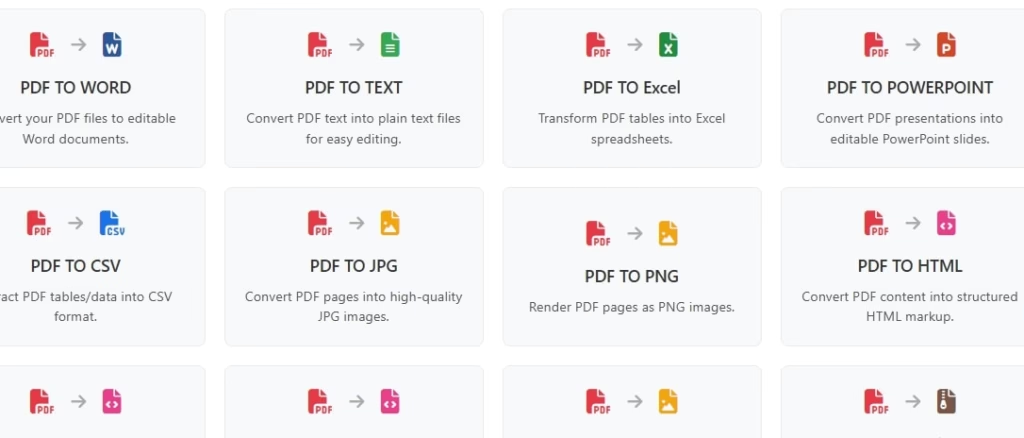
iTrustPDF provides a set of browser-based tools focused on PDF conversion and basic document management. Users can convert PDF files into editable formats such as Word, Excel, PowerPoint, or images, and also convert those formats back into PDFs when finalizing documents.
Alongside conversions, iTrustPDF allows users to merge multiple PDFs, split large files into smaller sections, and compress PDFs to reduce file size for easier sharing. These features are commonly used in everyday workflows, especially when handling reports, invoices, or academic documents.
Tools like iTrustPDF are often used together with other Free Productivity Tools to streamline office and document-related tasks. For users unfamiliar with how PDFs work under the hood, Adobe’s overview of the PDF format explains why PDFs remain a standard for document sharing and consistency across devices.
Pro Tips for Using iTrustPDF Effectively
- Convert PDFs to Word or PowerPoint before editing, then export back to PDF
- Compress files before emailing to avoid attachment size limits
- Merge related documents to keep reports or contracts organized
- Add passwords to PDFs before sharing sensitive information
- Rename downloaded files clearly to avoid version confusion
These small practices can significantly improve document workflow efficiency.
Frequently Asked Questions (FAQs)
1. Is iTrustPDF really free to use?
Yes, iTrustPDF provides free access to its main PDF conversion and document tools without mandatory payment.
2. Do I need to sign up to use iTrustPDF?
Most basic tools can be used without registration, which makes it ideal for quick tasks.
3. Is iTrustPDF safe for online PDF conversion?
Like most online PDF tools, iTrustPDF processes files through a browser-based system. For best practices, avoid uploading highly confidential files to any online service.
4. What file formats does iTrustPDF support?
It supports PDF, DOC, DOCX, XLS, XLSX, PPT, PPTX, JPG, and PNG formats.
5. Can iTrustPDF be used on mobile devices?
Yes, since it runs in a web browser, it works on smartphones and tablets as well.
Conclusion
iTrustPDF is a reliable free online PDF converter that covers essential document needs without unnecessary complexity. From converting and compressing files to organizing and securing PDFs, it delivers practical functionality for everyday use. For users who want a simple, browser-based PDF solution that doesn’t require payment or installation, iTrustPDF is a dependable choice.
What's free in iTrustPDF
iTrustPDF offers free access to its core PDF tools, making it suitable for users who need essential document functionality without paying for subscriptions.
Free features include:
- PDF to Word, Excel, PowerPoint, JPG, and PNG conversion
- Word, Excel, PowerPoint, and image files to PDF
- Merging multiple PDFs into a single file
- Splitting PDFs by page range
- Compressing PDFs to reduce file size
- Adding basic password protection to PDFs
- Full browser-based usage with no software installation
How the free version helps:
The free version works well for light to moderate usage, such as student assignments, office documentation, and freelance work. Users can complete most tasks without creating an account, which makes it convenient for quick, one-off conversions.
For general PDF security practices when sharing files online, Adobe also outlines recommended approaches to protecting documents. In most everyday scenarios, the free features offered by iTrustPDF are sufficient for managing and sharing PDFs safely and efficiently.
Is iTrustPDF free to use?
- Categories: Free Online Converters
- Tags: Completely Free
- Submitted by: Ahamed Khan
-
58
Submit a Free Tool
Explore more useful tools on Freeble, including curated Free Image Editing Tools to complement your document workflow.
More Free Tools and Resources
Still unsatisfied? 😒 We have few more resources for you. Try now!
- Freeble user
Submit your free resource and make someone's day!
We’re curating some great free online resources. Help our community with your knowledge on free resources.